
The Beginner’s Guide to Databases
Databases are the unsung heroes of modern technology. They power everything from your favorite social media apps to the analytics dashboards that businesses rely on for decision-making. But with over 300+ databases available, each designed for specific use cases, choosing the right one can feel overwhelming. Whether you’re a seasoned developer or an aspiring PM, understanding databases is crucial for building efficient, scalable, and reliable systems.
In this guide, we’ll explore databases in depth, using relatable metaphors, real-world examples, and clear explanations to help you understand how they work, why they matter, and how to choose the right one for your needs.
The Flour Metaphor: Databases as Ingredients
Let’s start with a metaphor: baking bread.
When baking, the type of flour you use determines the texture, flavor, and structure of your bread. High-protein flour (like bread flour) creates a chewy, dense loaf, perfect for pizza or bagels. Low-protein flour (like cake flour) makes light, flaky pastries. All-purpose flour works for everything, but it’s not ideal for specialized recipes.
Databases are like flour. Each one is designed for specific use cases. You can use any database for anything, but choosing the right one ensures the best possible bread outcome. To understand which database to use, ask two key questions:
What does the data look like?
What do you need to do with it?
Let’s break these down.
1. What Does the Data Look Like?
Databases are optimized for specific types of data. While you can store any piece of data in any database, the way data is inserted and retrieved matters most. Postgres is relational, but supports big blobs of text. Nothing is stopping you from storing your user data in Elastic. Nevertheless, many databases are designed with specific types or shapes of data in mind.
Here’s a closer look at how data shape influences database choice:
Structured Data
What it is: Data with a clear, predefined schema (e.g., tables with rows and columns).
Example: User profiles, orders, or inventory.
Best databases: Relational databases like Postgres, MySQL, or MSSQL.
Unstructured or Semi-Structured Data
What it is: Data without a fixed schema (e.g., JSON documents, logs, or social media posts).
Example: Tweets, sensor data, or product reviews.
Best databases: NoSQL databases like MongoDB, Cassandra, or Elasticsearch.
Interconnected Data
What it is: Data with complex relationships (e.g., social networks, recommendation engines).
Example: Friend connections on Facebook or product recommendations on Amazon.
Best databases: Graph databases like Neo4J.
Time-Series Data
What it is: Data indexed by time (e.g., stock prices, sensor readings).
Example: Hourly temperature data or daily financial transactions.
Best databases: Time-series databases like InfluxDB or TimescaleDB.
2. What Do You Need to Do with the Data?
Different types of data – and even similar types of data for different use cases – get used in different ways. How you use the data determines the database you need. Here are some common use cases and the databases that excel in them:
OLTP (Online Transactional Processing)
These are the databases that you use for the core data in your application, think your user data. Data is being read and inserted constantly. Queries are usually small and quick. Data integrity is key.
What it is: Real-time, transactional data processing (e.g., user actions, payments).
Example: Adding items to a shopping cart or updating a user profile.
Best databases: Relational databases like Postgres or MySQL.
OLAP (Online Analytical Processing)
These are the databases that you use for analytics and data science, think Snowflake etc. Data is being read and inserted sporadically. Queries are usually large and complex.
What it is: Complex queries on large datasets for analytics or business intelligence.
Example: Calculating monthly revenue or analyzing user behavior.
Best databases: Data warehouses like Snowflake, BigQuery, or Redshift.
Operational Use Cases
What it is: Logs, monitoring, caching, or internal processes.
Example: Storing server logs or managing user sessions.
Best databases: Elasticsearch for logs, Redis for caching, or Prometheus for monitoring.
The fact that users of the database need to do different things with the data inside of it necessitates storing said data differently.
OLTP vs. OLAP is one example, but there are many different ways to break down those use cases. Some databases have special UIs on top for analysis (like Kibana and Elastic). Others are built for massive scale from the start. Some are made to handle many different situations decently well. No matter what database you’re dealing with, thinking about what kind of data it stores and how you need to use that data is the key to understanding each.
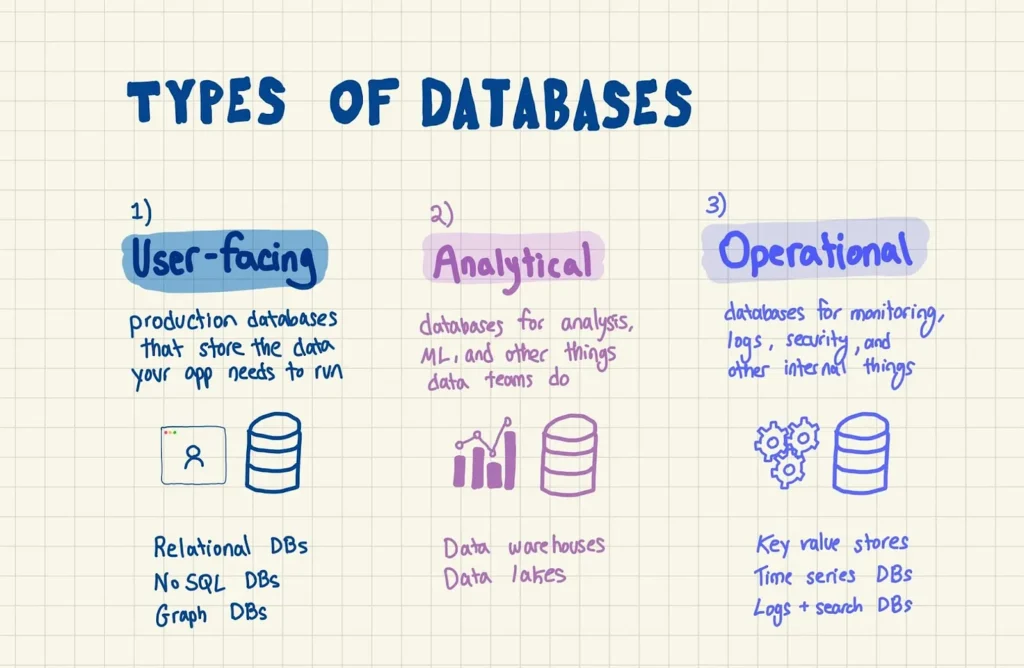
3 major categories of databases and what they do
Crude as it may be, I find it useful to think of 3 major categories of databases. Some databases can overlap and cross categories. For example, there are NoSQL databases built for powering your app, but there are also NoSQL databases meant for in-memory stuff (e.g. Redis is technically NoSQL). Here are the major ones:
Databases that power a user-facing app – production databases that store the data you need for your app to run.
Databases that power analytics – databases for analysis, machine learning, and anything a data team does.
Databases that power operations – databases for monitoring, logs, security, and any internal processes that enable the above.
Let’s run through each category and cover a few examples for each.
1. Databases That Power User-Facing Apps
Databases that power a user-facing app – often referred to as production databases or production data stores – are where developers store and query whatever data their app needs to run. Any “data” you’re seeing on your screen sits here.
If you’re Twitter: tweets, user profiles, trending topics, DMs
If you’re Gmail: emails, settings, spam filters
If you’re Amazon: orders, users, credit cards
Production databases are built to support small and quick queries. The most important thing is data integrity and reliability – you don’t want to lose an order or a credit card.
A. User-facing DBs / Relational Databases
- Relational databases: are the database OGs. They’ve been around for pretty much as long as databases have been around, and are the default choice today for storing the basic data your application needs to run. Data is stored in a very structured format with rigid definitions of tables, columns, and how tables relate to each other; that way, queries can run quickly and reliably.
- Postgres is an open source relational database initially released back in 1997. It’s one of the standard “boilerplate” choices for teams getting started on a new app. You can run Postgres yourself on a server, or pay someone like Amazon to run it for you.
- MySQL is also an open source relational database, initially released in 1995. It’s the other database most teams reach for, although since Oracle bought Sun (and ergo MySQL), there are legal ramifications to modifying the MySQL code for commercial use. In terms of MySQL vs. Postgres, the short story is that they’re very, very similar but have a few important differences with how they handle data types, storage engines, and a few other things.
- MSSQL is Microsoft’s proprietary SQL database. It’s popular among very large companies but not for smaller startups.
- Oracle was the first commercial relational database ever. Today it’s got the reputation of being the slowest moving company in California, but nevertheless powers the apps of tons and tons of Fortune 50 companies. Like MSSQL, this is a database for massive organizations and not startups.
- MariaDB is another open source relational database, from the original creators of MySQL. They (in a somewhat cheeky fashion) seem to be pretty pissed about Oracle limiting contributions to MySQL, so they focus on how open the community is and how the software will never require a license.
- SQLite is a software library that lets you run a small database inside of your application. It’s used in one way or another in tons and tons of apps, usually as an intermediate database as opposed to a core production store. The website says it’s on every single Android, iPhone, etc.
B. User-facing DBs / NoSQL Databases
- NoSQL: databases remove the structure and rigidity from relational databases, and let you just dump data in there and worry about how it looks later. There are NoSQL databases for all different categories of database (analytics, operational) but these here are for production, user-facing use.
- MongoDB popularized the NoSQL moniker and is the default choice if you’re looking for a NoSQL database to power your app. Their cloud product, Atlas, is the AWS RDS equivalent for basic NoSQL.
- Cassandra is a NoSQL database built for really big companies who need to store lots of data and retrieve it fast. Unlike MongoDB, which is built as a document database, Cassandra is oriented more around a columnar setup, which means data is stored in entire columns (like Snowflake, actually). Using Cassandra feels a lot more like using a relational database. Thank you to Neo Kim from the System Design Newsletter for pointing out that Cassandra is actually technically not a columnar data store, but instead implements the concept of a wide column family, which is slightly different.
- DynamoDB is AWS’s proprietary NoSQL database.
- Firebase is a series of tools (acquired by Google back in the day) for building apps, targeted at smaller teams and focusing on simplicity. Their database is called Firestore and it’s a really popular option for a quick, just-get-me-started kind of DB.
C. User-facing DBs / Graph Databases
Every company’s data is different, and for some it makes the most sense to model things as a sort of graph of interconnected nodes. Facebook famously runs their social graph on an in house graph database called Tao. The use cases for graph DBs are mostly user-facing, but they’re sometimes useful for analytical purposes too.
- Neo4J is the most popular graph database. It’s open source but if you’re going to scale it up, you’ll need to talk to them about their enterprise license. Data in Neo4J is represented as nodes, and nodes can be connected to each other in different ways. Cyper is the name of their SQL-esque language for querying the graph.
2. Databases that power analytics
What a data team needs from their database is very different from developers working on an app. For data science and analytics work, the data you store is often redundant, there’s tons of it, and your queries join data from multiple tables at once. Data usually gets queried by someone sitting at a computer doing research, or a system building a pipeline, and gets inserted at regular intervals (twice a day, something like that).
A. Analytical DBs / Data Warehouses
Data warehouses are (usually) relational databases for storing analytical data, like what your users have been doing, revenue by month, things like that. They’re optimized for big, long, multi-table queries. They’re usually relational databases in nature, although the implementation details can vary.
- Snowflake is a cloud data warehouse for analytics. It’s columnar, which means that data is stored (under the hood) in entire columns instead of rows; this makes large analytical queries faster, so it’s a common choice for how to build analytical DBs.
- BigQuery is also a cloud data warehouse for analytics. It’s very similar to Snowflake.
- Redshift is also a cloud data warehouse for analytics. It’s very similar to Snowflake and BigQuery.
- Clickhouse is an open source (!) data warehouse for analytics. It was originally developed at Yandex, and is getting more popular.
🤔 Why can’t I use Postgres as a data warehouse?
You can, people did for a long time, and some still do. But modern cloud data warehouses are just waaaaay faster for large queries on meaningful quantities of data. This is the thing about databases: you can use anything for anything, but there comes a point where you need a specialized tool for the job.
B. Analytical DBs / Data Lakes
- Data Lakes are basically giant data safes. You throw whatever you want in there – structured, unstructured, big, small, organized, disorganized, whatever – and then worry about structure when it’s time to get the data out. Contrast that with a data warehouse, which like a relational database, has rigid structure around tables, columns, and data types.
- S3 is AWS’s object storage solution – usually used for storing things like images and videos for applications – but is also commonly used as a data lake. You can’t “query” S3 in the way that you can a database, so you need to use a layer on top (like AWS’s Lake Formation) to intermediate.
- Databricks, a company that I wrote about back in the day, sells a product they call “the lakehouse platform.” Under several layers of caked marketing makeup, it’s an open source data lake and storage layer built to resemble a sort of data warehouse; they’re trying to blur the distinction between the two.
Though it’s unlikely you’ll see it in production today, HDFS was a highly popular way to build a data lake before the cloud data warehouse era. It’s powered by Hadoop, one of the original frameworks for performing distributed computations on large groups of data. It was/is notorious for being very, very hard to set up and run.
C. Analytical DBs / GIS Databases
This is a bit of a niche one, but worth mentioning: there’s a class of databases (or in some cases, database extensions) that are purpose built for working with geographical data. GIS stands for Geographic Information System. In terms of the actual data being stored here, it can be anything from points and lines to complex 3D data; structures that don’t map (no pun intended) well to traditional database schemas.
- PostGIS is a PostgreSQL extension for storing and working with geographical data. It’s a combination of features for storage, analysis (special geographical functions like intersections, measuring distances, etc.), and other miscellaneous stuff like geocoding.
- Kinetica is an enterprise-focused database for storing geospatial and time series data.
- Oracle Spatial Database is also an enterprise-focused database for storing geospatial data, from our friends at big red.
Databases that power operations
This is the category you’ll probably encounter least if you’re not an engineer. The 3rd category of databases covers data stores that developers use to power internal operations: monitoring application performance, storing logs and security information, improving application speed, or even intermediate layers between other databases.
Operational DBs / Key Value Stores
While pretty much all of the databases we’ve covered so far store permanent data – saved on a harddrive – there’s a class of databases that only keeps data in memory. They’re meant for ephemeral data that you need to store and use quickly, but you don’t mind if it disappears down the road. These databases are called key value stores (or KV stores) because the way they store data is like a dictionary, where each entry has a key.
- Redis is the OG key value store. It’s an in memory database that teams use for a bunch of different stuff: building caches, managing authentication sessions, chat and messaging, and any other use cases that prioritize real time, very quick data retrieval. Redis is open source but you can also pay them to host it for you.
- SingleStore (FKA MemSQL) is an in memory database like Redis, more focused on general purpose kinds of workloads than typical in memory database use cases.
Operational DBs / Time Series Databases
Time series databases are DBs built specifically for storing data on some sort of time frame: daily financial data, second-by-second sensor readings, hour-by-hour health checks on your servers, anything like that.
- Timescale is an extension to Postgres, sold as an independent cloud hosted database. It takes everyone’s favorite relational database and adds special time-series specific functionality like automatic partitioning and query optimizations.
- Prometheus is an open source time series database with built in alerting and visualization.
- InfluxDB is also an open source time series database.
Operational DBs / Logs and Search Databases
- Elastic is a NoSQL database built for storing and searching through logs, or very granular records of server performance, API requests, and internal stuff like that. Elasticsearch is commonly used with Kibana, its sister data visualization tool.
- Solr is also a NoSQL database built for storing and searching through logs.

About the Author
